 Ashigrain
What is halation, and how to add it in DaVinci Resolve
The red-orange glow film adds around bright highlights: what causes it, how antihalation layers and gauge change it, and how to add it in DaVinci Resolve.
- Spread on film
- 0.08mm
- Gaussian sigma, every stock (model approximation)
- Threshold
- 2.5stops
- Above mid-grey exposure, default
- Layer weights
- 1 · 0.25 · 0
- Red · green · blue (model approximation)
- No backing
- ×6
- Rem-jet strength, rem-jet removed
Short answer
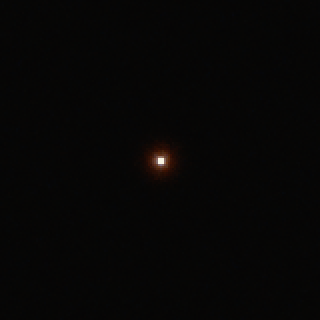
Halation is a glow around bright highlights on film, and the halation effect people add in grading imitates it.
Light goes through the emulsion, bounces back off the film base and exposes the emulsion a second time, just beside where it first landed. On colour negative it shows as a red to orange fringe round lamps, practicals and specular highlights. To add it in DaVinci Resolve, put Ashigrain on a node on the Color page, choose a film stock, and set Halation amount.
01 — What halation is
What halation is
Film is a stack of layers: the light-sensitive emulsion sits on a transparent base, and in a colour film the emulsion itself is several layers, one each for red, green and blue light. Some light passes right through the emulsion. Where the emulsion meets the base, part of it bounces back up and exposes the emulsion again. Kodak’s Essential Reference Guide for Filmmakers describes the result as “a secondary exposure around images of bright objects” and names it halation. It costs the image some sharpness and scatters a little light (Kodak H-845, PDF p.33).
“A secondary exposure around images of bright objects.”
Kodak, Essential Reference Guide for Filmmakers, H-845, PDF p.33
The reflected light re-enters the emulsion from below. In Ashigrain’s model, the layers nearest the base take most of it. It shows up next to bright objects, where enough light gets through to leave a visible second image. A grey wall does not halate. A bare bulb, a street lamp at night or the sun on chrome does.
So halation belongs to the highlights, not to the whole image. Its colour depends on which layers the light re-exposes, and Ashigrain assumes, as a model approximation, that the returning light mostly reaches the red-sensitive layer, with a little reaching the green layer and none reaching the blue. That gives the familiar red-orange halo.
02 — How film stocks fight halation
How film stocks fight halation: rem-jet, undercoat and dyed base
Kodak treats halation as an unwanted side effect. Many films carry an antihalation layer, a dark coating in or on the base that soaks up the reflected light. Kodak describes three common ways of doing this (Kodak H-845, PDF pp.33-34); the fourth class is taking it away.
- ×1
Rem-jet backing
Rem-jet (short for removable jet black) is a backing of carbon black in a binder that dissolves in water, coated on the back of the film. Besides absorbing stray light, it stops static, helps the film run smoothly and guards the base against scratches (PDF p.33). The lab washes it off at the very start of processing, ahead of the developer (PDF p.34).
Example stock: Vision3 500T 5219. The Kodak Vision3 camera negatives use it; the 5219 datasheet lists a rem-jet backing (Kodak H-1-5219t, p.1).
- ×0.5
Antihalation undercoat
An antihalation undercoat sits between the emulsion and the base: a gelatin layer coloured with silver or dye. Kodak mentions it for some thin-emulsion films, and processing clears its colour (PDF p.34).
Example stock: Velvia 50. Fujifilm Velvia 50’s datasheet prints the undercoat (Fujifilm AF3-0221E2, p.7).
- ×2
Grey (dyed) base
A dyed film base has a grey, neutral-density dye mixed into the base itself. The dye cuts halation and also keeps light from travelling along the base from the film’s edge. Kodak puts the dye density anywhere from almost nothing up to roughly 0.2, and says the denser bases are mostly black-and-white negatives on cellulose, where the dye is there for halation (PDF p.34).
Example stock: Double-X 5222, on a grey acetate base (Kodak H-1-5222, p.1).
- ×6
No backing
Rem-jet removed: with no absorber, the back of the base reflects the light straight into the emulsion. See rem-jet removal and the no-backing look.
Example stock: Vision3 500T 5219 with the Rem-jet removed option on.
The strengths are relative to rem-jet and are model approximations. None of these sources says how much halation each method leaves: the available datasheets do not quantify halation.
03 — Rem-jet removal
Rem-jet removal and the no-backing look
Take the rem-jet off a stock like Vision3 500T and the film loses its main defence. Hard highlights then pick up a much stronger red halo.
- With rem-jet
- 1.87
- Levels of 255, 8-bit sRGB
- Rem-jet removed
- 8.12
- Levels of 255, 8-bit sRGB
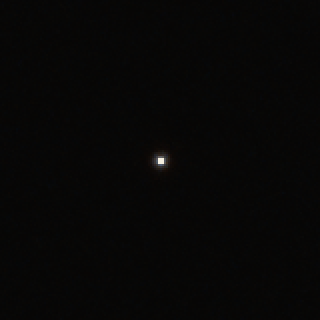
In a ring 3 to 20 px from each point of that render, red exceeds the average of green and blue by 1.87 levels (of 255, 8-bit sRGB) with rem-jet and by 8.12 without. That measures our model, not film.
In Ashigrain this is the Rem-jet removed option, in the Halation group, and it works on every film. It renders the film without its rem-jet backing or, on a film without one, without its other antihalation layer. Every film then gets the no-layer halation strength, six times the rem-jet strength, which is a model approximation. The option does not change the film’s characteristic curves, grain, dyes or sharpness.
Some Vision3 films are sold for still photography with the rem-jet removed, under a repackager’s own name and box speed. Where a repackager publishes such a rating, Rem-jet removed also rates the film at it, and the rating sets the exposure, tone and print like any film’s EI:
| Film | Kodak rating | Rating with Rem-jet removed | Source |
|---|---|---|---|
| Vision3 500T 5219 | EI 500 (tungsten) | EI 800 (tungsten) | CineStill 800T; Reflx Lab 800T |
| Vision3 250D 5207 | EI 250 (daylight) | EI 400 (daylight) | Reflx Lab 400D |
| Vision3 50D 5203 | EI 50 (daylight) | EI 100 (daylight) | Reflx Lab 100D |
| Vision3 200T 5213 | EI 200 (tungsten) | EI 200, unchanged | Reflx Lab 200T |
These ratings are repackagers’ box speeds, not measurements. Each Reflx Lab page names the Kodak film it is made from, for example “Made from fresh 5219 motion picture film”, and the 400D, 100D and 200T pages say “Rem-Jet layer removed”. CineStill’s 800T page gives EI 800 at 3200K and says the film is “Remjet backing free”, but it does not name the Kodak film. Reflx Lab’s 200T has Kodak’s own rating, so on 200T the option changes only the halation. Every other film keeps its rating.
Ashigrain used to list a separate film, Kodak Vision3 500T, rem-jet removed. The option replaces it: a grade or preset saved with that film opens as Vision3 500T 5219 with Rem-jet removed on, so it keeps the no-layer halation and the EI 800 rating.
04 — Why gauge matters
Why gauge matters
Halation happens inside the film, so its size is fixed in millimetres, not pixels. A smaller gauge has a smaller frame, and when that frame is scanned or rendered at the same pixel width, every millimetre of film covers more pixels.
Ashigrain uses a Gaussian spread with a sigma of 0.08 mm on the film. That figure is a model approximation, because no source gives the base thickness the real spread would depend on.
One highlight, three gauges, four sizes
Super 35 4-perf, 4 px Halo reaches about 11 px beyond the 4 px disc. 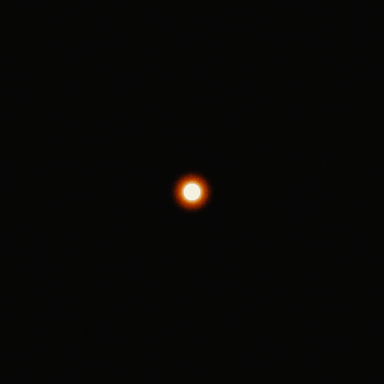
Super 35 4-perf, 16 px Halo reaches about 15 px beyond the 16 px disc. 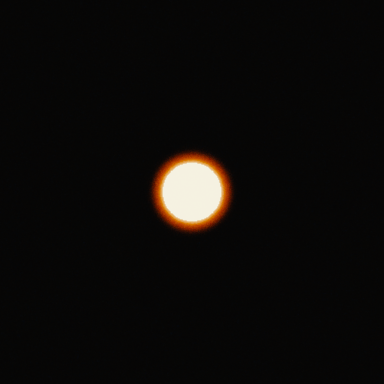
Super 35 4-perf, 58 px Halo reaches about 15 px beyond the 58 px disc. 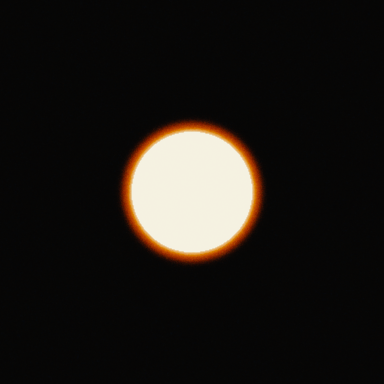
Super 35 4-perf, 120 px Halo reaches about 15 px beyond the 120 px disc. 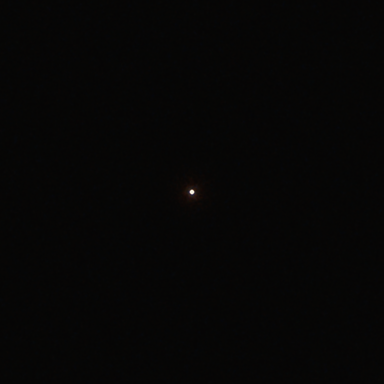
Super 16, 4 px Halo reaches about 14 px beyond the 4 px disc. 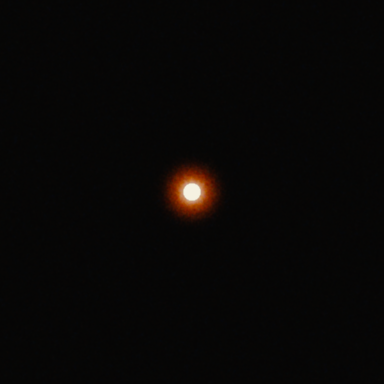
Super 16, 16 px Halo reaches about 27 px beyond the 16 px disc. 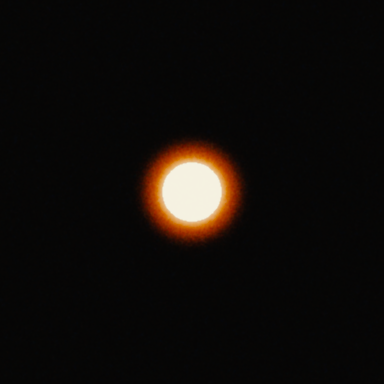
Super 16, 58 px Halo reaches about 29 px beyond the 58 px disc. 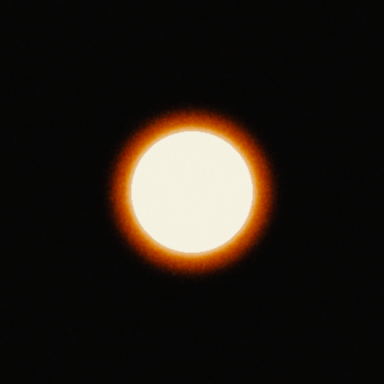
Super 16, 120 px Halo reaches about 30 px beyond the 120 px disc. 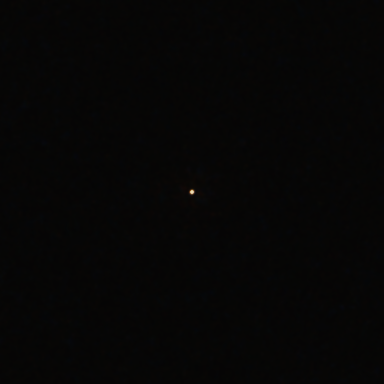
Super 8, 4 px Halo reaches about 2 px beyond the 4 px disc. 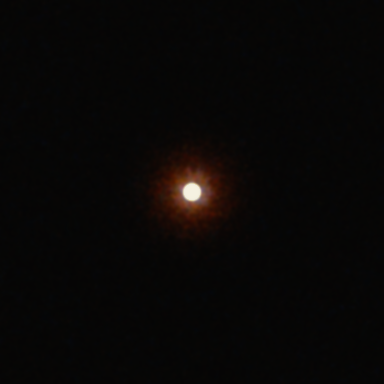
Super 8, 16 px Halo reaches about 49 px beyond the 16 px disc. 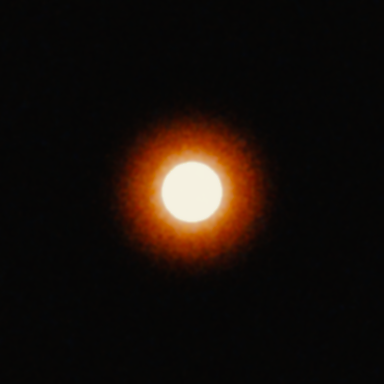
Super 8, 58 px Halo reaches about 62 px beyond the 58 px disc. 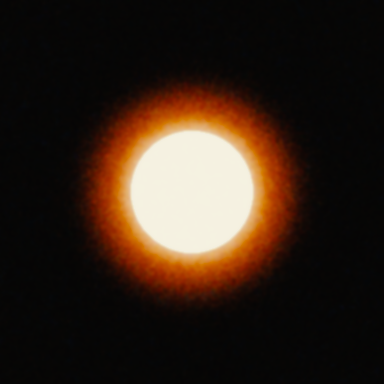
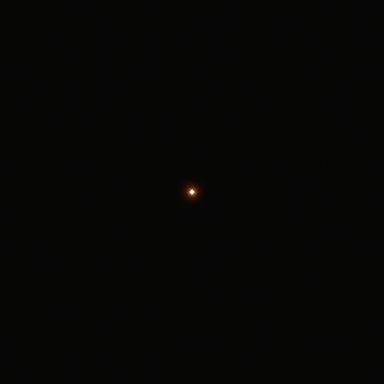
Super 8, 120 px Halo reaches about 64 px beyond the 120 px disc. Model render of a synthetic highlight at four sizes: discs 4, 16, 58 and 120 px across (a tiny point, a bulb, a lamp and a window; scene-linear 16 on 0.02) on the 5219 no-rem-jet variant, printed on 2383, at Super 35 4-perf, Super 16 and Super 8, 1920 px wide frames, 1:1 crops 384 px square, gate weave and flicker off. The halation spread is the same on film (sigma 0.08 mm, a model approximation), so it covers about 6.2, 12.3 and 27 px. From the tiny point to the window the halo's reach beyond the disc never shrinks: 11 to 15 px on Super 35 4-perf; 14 to 30 px on Super 16; 2 to 64 px on Super 8 (to where the red excess falls below 4 of 255). The halo of a tiny point reaches 11 px on Super 35 4-perf, 14 px on Super 16 and only 2 px on Super 8: on Super 8 the same light spreads over more pixels and is fainter in each one, so most of it stays below the threshold. Halation sigma in pixels
Format Frame width Sigma at 1920 px Sigma at 3840 px Super 35 (4-perf) 24.89 mm 6.2 px 12.3 px Super 16 12.52 mm 12.3 px 24.5 px Super 8 5.69 mm 27.0 px 54.0 px
Chart data
| gauge | Series | halation sigma in pixels (0.08 mm on film) |
|---|---|---|
| Super 35 4-perf | 1920 px wide image | 6.2 |
| Super 16 | 1920 px wide image | 12.3 |
| Super 8 | 1920 px wide image | 27 |
| Super 35 4-perf | 3840 px wide image | 12.3 |
| Super 16 | 3840 px wide image | 24.5 |
| Super 8 | 3840 px wide image | 54 |
Choose a gauge, then drag Highlight size from a tiny point to a window. As the highlight grows, the halo’s reach beyond it grows or stays the same; it never shrinks. A wider halo is not always a brighter one, though. The same amount of reflected light is spread over more pixels, so each pixel of it is fainter. A tiny point of light shows this most: in these renders its halo reaches 11 px on Super 35 4-perf and 14 px on Super 16, but only 2 px on Super 8, where most of it stays below the visibility threshold. For a larger highlight, such as a lamp shade or a window, the halos from all its pixels add up and the visible glow gets wider: a 120 px window’s halo reaches 15 px on Super 35 4-perf and 64 px on Super 8.
On Super 8 you may also see very small highlights come out dimmer and warmer than on 35 mm. That is the film’s softness (its MTF) and the default gate weave smearing a few pixels of light, not halation.
05 — How Ashigrain models halation
How Ashigrain models halation
Ashigrain adds halation to the exposure each film layer receives, before the film’s curves, so the halo goes through the negative and the print like the rest of the image. The stage has four parts.
- 01
Threshold
Only exposure above a soft threshold halates. The default is 2.5 stops above the mid-grey exposure, with a knee of 1 (in multiples of the mid-grey exposure) that sets how gradually it starts.
- 02
Spread
The light above the threshold is blurred with a Gaussian, sigma 0.08 mm on the film. This radius is a model approximation: no source states a base thickness, so it does not change from stock to stock.
- 03
Layer weights
The blurred light is added back to the red, green and blue layers with weights of 1, 0.25 and 0, a model approximation of the returning light mostly reaching the red layer. A black-and-white film has one layer, so its halation is neutral.
- 04
Strength by antihalation class
The amount depends on the film’s backing, relative to rem-jet: ×1 rem-jet, ×0.5 undercoat, ×2 grey base, ×6 none (the class cards above give each default amount and example stock). These strengths are model approximations; the available datasheets do not quantify halation.
The ordering follows from where each absorber sits. An undercoat stops the light before it crosses the base, rem-jet absorbs it at the back of the base, a grey base only dims it on the way through and back, and with no absorber the back of the base reflects it into the emulsion. The ratios between them are our choice, not measurements. The stock guide lists each film’s class and says where the class is printed on the datasheet and where it is assumed.
Dotted line: background exposure 0.111111.
Chart data
| Series | distance from the point on film (mm) | red-layer exposure (× 18 % grey) |
|---|---|---|
| rem-jet backing | 0 | 89.0107 |
| rem-jet backing | 0.01296 | 89.009 |
| rem-jet backing | 0.02593 | 0.226496 |
| rem-jet backing | 0.03889 | 0.219308 |
| rem-jet backing | 0.05185 | 0.210098 |
| rem-jet backing | 0.06482 | 0.199339 |
| rem-jet backing | 0.07778 | 0.187689 |
| rem-jet backing | 0.09074 | 0.175805 |
| rem-jet backing | 0.10371 | 0.164343 |
| rem-jet backing | 0.11667 | 0.153959 |
| rem-jet backing | 0.12964 | 0.144738 |
| rem-jet backing | 0.1426 | 0.136759 |
| rem-jet backing | 0.15556 | 0.130106 |
| rem-jet backing | 0.16853 | 0.12486 |
| rem-jet backing | 0.18149 | 0.120825 |
| rem-jet backing | 0.19445 | 0.117805 |
| rem-jet backing | 0.20742 | 0.115602 |
| rem-jet backing | 0.22038 | 0.114021 |
| rem-jet backing | 0.23334 | 0.112941 |
| rem-jet backing | 0.24631 | 0.112244 |
| rem-jet backing | 0.25927 | 0.111808 |
| rem-jet backing | 0.27223 | 0.111515 |
| rem-jet backing | 0.2852 | 0.111334 |
| rem-jet backing | 0.29816 | 0.111232 |
| rem-jet backing | 0.31112 | 0.111181 |
| rem-jet backing | 0.32409 | 0.111147 |
| rem-jet backing | 0.33705 | 0.111128 |
| rem-jet backing | 0.35002 | 0.111119 |
| rem-jet backing | 0.36298 | 0.111115 |
| rem-jet backing | 0.37594 | 0.111113 |
| rem-jet backing | 0.38891 | 0.111112 |
| antihalation undercoat | 0 | 88.9498 |
| antihalation undercoat | 0.01296 | 88.9489 |
| antihalation undercoat | 0.02593 | 0.168803 |
| antihalation undercoat | 0.03889 | 0.165209 |
| antihalation undercoat | 0.05185 | 0.160604 |
| antihalation undercoat | 0.06482 | 0.155225 |
| antihalation undercoat | 0.07778 | 0.1494 |
| antihalation undercoat | 0.09074 | 0.143458 |
| antihalation undercoat | 0.10371 | 0.137727 |
| antihalation undercoat | 0.11667 | 0.132535 |
| antihalation undercoat | 0.12964 | 0.127924 |
| antihalation undercoat | 0.1426 | 0.123935 |
| antihalation undercoat | 0.15556 | 0.120609 |
| antihalation undercoat | 0.16853 | 0.117986 |
| antihalation undercoat | 0.18149 | 0.115968 |
| antihalation undercoat | 0.19445 | 0.114458 |
| antihalation undercoat | 0.20742 | 0.113357 |
| antihalation undercoat | 0.22038 | 0.112566 |
| antihalation undercoat | 0.23334 | 0.112026 |
| antihalation undercoat | 0.24631 | 0.111677 |
| antihalation undercoat | 0.25927 | 0.11146 |
| antihalation undercoat | 0.27223 | 0.111313 |
| antihalation undercoat | 0.2852 | 0.111222 |
| antihalation undercoat | 0.29816 | 0.111172 |
| antihalation undercoat | 0.31112 | 0.111146 |
| antihalation undercoat | 0.32409 | 0.111129 |
| antihalation undercoat | 0.33705 | 0.11112 |
| antihalation undercoat | 0.35002 | 0.111115 |
| antihalation undercoat | 0.36298 | 0.111113 |
| antihalation undercoat | 0.37594 | 0.111112 |
| antihalation undercoat | 0.38891 | 0.111112 |
| grey base | 0 | 89.1325 |
| grey base | 0.01296 | 89.129 |
| grey base | 0.02593 | 0.341881 |
| grey base | 0.03889 | 0.327505 |
| grey base | 0.05185 | 0.309084 |
| grey base | 0.06482 | 0.287567 |
| grey base | 0.07778 | 0.264267 |
| grey base | 0.09074 | 0.240498 |
| grey base | 0.10371 | 0.217574 |
| grey base | 0.11667 | 0.196808 |
| grey base | 0.12964 | 0.178364 |
| grey base | 0.1426 | 0.162407 |
| grey base | 0.15556 | 0.149101 |
| grey base | 0.16853 | 0.138609 |
| grey base | 0.18149 | 0.13054 |
| grey base | 0.19445 | 0.124499 |
| grey base | 0.20742 | 0.120094 |
| grey base | 0.22038 | 0.116931 |
| grey base | 0.23334 | 0.114772 |
| grey base | 0.24631 | 0.113376 |
| grey base | 0.25927 | 0.112505 |
| grey base | 0.27223 | 0.111919 |
| grey base | 0.2852 | 0.111556 |
| grey base | 0.29816 | 0.111354 |
| grey base | 0.31112 | 0.11125 |
| grey base | 0.32409 | 0.111184 |
| grey base | 0.33705 | 0.111146 |
| grey base | 0.35002 | 0.111127 |
| grey base | 0.36298 | 0.11112 |
| grey base | 0.37594 | 0.111115 |
| grey base | 0.38891 | 0.111113 |
| no antihalation layer | 0 | 89.6197 |
| no antihalation layer | 0.01296 | 89.6093 |
| no antihalation layer | 0.02593 | 0.803419 |
| no antihalation layer | 0.03889 | 0.760291 |
| no antihalation layer | 0.05185 | 0.70503 |
| no antihalation layer | 0.06482 | 0.640479 |
| no antihalation layer | 0.07778 | 0.57058 |
| no antihalation layer | 0.09074 | 0.499273 |
| no antihalation layer | 0.10371 | 0.4305 |
| no antihalation layer | 0.11667 | 0.368201 |
| no antihalation layer | 0.12964 | 0.31287 |
| no antihalation layer | 0.1426 | 0.264999 |
| no antihalation layer | 0.15556 | 0.22508 |
| no antihalation layer | 0.16853 | 0.193606 |
| no antihalation layer | 0.18149 | 0.169397 |
| no antihalation layer | 0.19445 | 0.151274 |
| no antihalation layer | 0.20742 | 0.138059 |
| no antihalation layer | 0.22038 | 0.128571 |
| no antihalation layer | 0.23334 | 0.122093 |
| no antihalation layer | 0.24631 | 0.117907 |
| no antihalation layer | 0.25927 | 0.115294 |
| no antihalation layer | 0.27223 | 0.113535 |
| no antihalation layer | 0.2852 | 0.112446 |
| no antihalation layer | 0.29816 | 0.111839 |
| no antihalation layer | 0.31112 | 0.111529 |
| no antihalation layer | 0.32409 | 0.111329 |
| no antihalation layer | 0.33705 | 0.111214 |
| no antihalation layer | 0.35002 | 0.111159 |
| no antihalation layer | 0.36298 | 0.111137 |
| no antihalation layer | 0.37594 | 0.111123 |
| no antihalation layer | 0.38891 | 0.111116 |
For the whole chain from light to print, see How film emulation works.
06 — In DaVinci Resolve
How to add halation in DaVinci Resolve with Ashigrain
Ashigrain is an OpenFX plugin for macOS. It runs in DaVinci Resolve 20 or later, both the free edition and Studio. The Mac App Store edition of Resolve cannot activate it.
Place the node
On the Color page, find Ashigrain in the Effects library under OpenFX and drag it onto a node. Grade, especially exposure, in the nodes before it. If Ashigrain outputs a display gamma such as Rec.709 / Gamma 2.4, it must be the last node. In a DaVinci Wide Gamut timeline it can sit in the middle, with Resolve’s output transform after it.
Match colour management
Halation depends on how much exposure lands above the threshold, so Ashigrain has to decode your footage correctly. Set Input Color Space and Input Gamma to match the clip or timeline. The workflow guide has four Resolve setups, from a plain Rec.709 clip to a colour-managed project. Camera log footage helps here: a Rec.709 clip holds only the range Rec.709 can, while log in a wide-gamut workflow keeps the highlight detail that drives halation.
Pick a film
Choose a Preset or, in Pro view, a film in the Film section. The stock sets the default halation strength. Picking a stock also resets Radius and Threshold to their defaults. Choose Format too, since the gauge changes the size of the halo in pixels.
Set Halation amount
In Essentials, Halation amount is relative to the stock’s own strength: 1 is the stock default, 0 removes it, and the slider goes to 2 (typed values go up to 4).
Fine-tune in the Halation group
Switch View to Pro for the full Halation group:
- Radius (mm on film): the spread, default 0.08 mm.
- Threshold: in stops above mid-grey exposure, default 2.5. Lower it and more of the image halates.
- Knee: the softness of the threshold, default 1.
- Tint R, Tint G and Tint B: multipliers on the halation reaching each layer, default 1. These change the colour of the glow.
- Rem-jet removed: the no-layer strength, for a rem-jet-removed look on any stock. On Vision3 500T, 250D and 50D it also sets the repackager’s published rating (see Rem-jet removal). It is available even with Halation off; then it only sets the rating, since the stronger glow needs Halation on.
Bloom has its own group: a neutral glow around the brightest highlights that keeps the source colour, with a higher default threshold (3.5 stops).
Check it
In Output & Debug, set Debug view to Halation only. It shows only the halation and bloom light added, on black, so you can see which highlights glow. Bypass Halation & bloom turns the stage off for a quick before and after, and Split compare puts the input and result side by side. Every control is listed in the parameter reference.
07 — Common mistakes
Common mistakes
A glow on every highlight
If skin, white shirts and overcast skies all glow, the threshold is too low or the exposure going into Ashigrain is too high. Keep Threshold near the stock default, and check with Halation only that just the hard highlights light up.
The wrong colour
In Ashigrain’s model, halation on colour negative is red to orange because the returning light is assumed to reach mostly the red-sensitive layer. A white or blue glow is closer to what Ashigrain treats as bloom. With the model’s layer weights the halo is red with a little green. Use the Tint controls with care, and leave black-and-white films neutral.
A radius set in pixels
A blur set in pixels changes between HD and 4K and ignores the gauge. Ashigrain’s radius is in millimetres on the film, so the same setting gives about 6.2 px at 1920 and 12.3 px at 3840 on Super 35. If the glow looks too wide, check the Format before you shrink the radius.
08 — Questions people ask
Questions people ask
- Is halation the same as bloom?
No. In Ashigrain, halation is the reflection off the base, mostly red, and bloom is a separate neutral glow around the brightest highlights. Each has its own controls.
- Does every stock show film halation?
Every camera film in Ashigrain gets some halation, scaled by its antihalation class. Films with an undercoat get the least, and a film with Rem-jet removed the most. These strengths are model approximations.
- Is the halation in Ashigrain measured from real film?
No. Some datasheets name the antihalation layer, but none gives halation figures, so the strength, radius and layer weights are approximations that we chose and document.
- Why does my halo get bigger when I switch to Super 16?
The radius is fixed on the film. The Super 16 frame is about half the width of Super 35, so the same 0.08 mm covers about twice as many pixels.
- Does it work in the free version of Resolve?
Yes, in Resolve 20 or later on macOS. Only the Mac App Store edition cannot activate it.
For the other half of the film look, read film grain: what it is and how to emulate it.
Sources
- Eastman Kodak Company, KODAK Essential Reference Guide for Filmmakers, publication H-845 (2007), “Antihalation Backing”, PDF pages 33-34 (printed pages 31-32). https://www.kodak.com/content/products-brochures/Film/kodak-essential-reference-guide-for-filmmakers.pdf (retrieved 2026-09-23).
- Eastman Kodak Company, KODAK VISION3 500T Color Negative Film 5219 / 7219 Technical Data, publication H-1-5219t, revised 7-15, page 1. https://www.kodak.com/content/products-brochures/Film/VISION3-500T-Color-Negative-Film-7219-TECHNICAL-DATA.pdf (retrieved 2026-09-23).
- FUJIFILM Corporation, FUJICHROME Velvia 50 Professional [RVP 50] Data Sheet, AF3-0221E2 (2007), page 7. https://asset.fujifilm.com/www/us/files/2020-03/742f83fe2440fce58fbcc08f7370a7e6/AF3-0221E2Velvia50PIB.pdf (retrieved 2026-09-29).
- Eastman Kodak Company, EASTMAN DOUBLE-X Negative Film 5222 / 7222 Technical Data, publication H-1-5222, revised 7-15, page 1. https://www.wittnercinetec.com/WebRoot/Sage/Shops/WittnerCinetec-Super8-16mm-Film/MediaGallery/PDFs/PDFs_Kodak_16mm/EASTMAN_DOUBLE-X_Negative_Film_5222_7222.pdf (retrieved 2026-09-23).
- ARRI, Ground Glasses and Masks: ANSI Super 35 Formats, data sheet 2-7-0 (2010), page 1: Super 35 frame width (ARRI gives 24.9 mm; Ashigrain uses 24.89 mm). https://www.arri.com/resource/blob/75846/d954e726489ab40665b69e0910ac125e/2-7-0-ground-glasses-and-masks-ansi-super-35-formats-data.pdf (retrieved 2026-09-23).
- Wikipedia, “16 mm film”, revision 1374653089: Super 16 frame width. https://en.wikipedia.org/w/index.php?title=16_mm_film&oldid=1374653089 (retrieved 2026-09-23).
- filmkorn.org super 8 database, “super 8 film format standards”: Super 8 frame width. https://www.filmkorn.org/super8data/database/articles_list/super8_fotmat_standards.htm (retrieved 2026-09-23).
- CineStill, CineStill 800Tungsten High Speed Color Negative Film, 35mm 135 36exp. EI 800, 3200K, product page, Wayback Machine capture of 2026-09-15. https://web.archive.org/web/20260915053519/https://cinestillfilm.com/products/800tungsten-c41-36exp-35mm-high-speed-color-negative-135 (retrieved 2026-09-29).
- Reflx Lab, Reflx Lab 800T Tungsten 35mm Color Negative Film, product page, Wayback Machine capture of 2022-11-30. https://web.archive.org/web/20221130054626/https://reflxlab.com/products/pre-order-reflx-lab-800t-tungsten-color-negative-35mm-film (retrieved 2026-10-22).
- Reflx Lab, Reflx Lab 400D Daylight 35mm Color Negative Film, product page, Wayback Machine capture of 2023-02-09. https://web.archive.org/web/20230209082314/https://reflxlab.com/products/reflx-lab-400d (retrieved 2026-10-22).
- Reflx Lab, Reflx Lab 100D 35mm Color Negative Film 36EXP, product page, Wayback Machine capture of 2023-03-30. https://web.archive.org/web/20230330203504/https://reflxlab.com/products/reflx-lab-100d-daylight-35mm-color-negative-film (retrieved 2026-10-22).
- Reflx Lab, Reflx Lab 200 Tungsten 35mm Color Negative Film 36EXP, product page, Wayback Machine capture of 2024-09-15. https://web.archive.org/web/20240915104849/https://reflxlab.com/products/reflx-lab-200-tungsten-35mm-color-negative-film-36exp (retrieved 2026-10-22).